Thursday, 21 August 2014

XML Interview Questions And Answers

XML Interview Questions And Answers

What is full Form XML?
Extensible Markup Language.


What is XML?
It is text-based standard design for interchange the information between two application. There are no predefined tags and attributes in XML. you can create your own tags and attributes in tag.


Who created the XML?
Jon Bosak


Why It is so popular?
  • It is free standard for exchange information.
  • It is independent of language.
  • It is independent of Hosting Server 
  • Human Readable.
  • You can create your Own tags in XML. 
  • Used for embed images, video etc

Where XML is used?
It is used to exchange the information between two application. Information can also be exchanged between two different application which is running on different OR same server. It is used in Web Application, Mobile Application (IOS, Android, Iphone, window Phone) for providing the API. It is also used AS installer in web application, you can set the application configuration in XML file.


Why it is used?
  • It is Opensource.
  • It is easy to understand.
  • you can create your own tags. 
  • Independent of languages and OS.
  • You can embed photo, videos in XML.

What is file extension of XML?
.xml


How the raw XML file can be viewed in a browser?
Raw XML files can be viewed in Mozilla, Firefox, Opera, Internet Explorer and in Netscape. For make XML documents to display like nice web pages, you will have to add some display information.


How to parse XML in PHP?
http://www.web-technology-experts-notes.in/2013/05/parse-xml-in-php-by-example.html


What is a CDATA section in XML?
The CDATA is used when you don't want some text data be parsed by the XML parser.
<![CDATA[ HERE IS NON-PARSED DATA]]>
Now, above data will not parse.


What is XQuery?
Xquery is a query language that is used to retrieve data from XML documents. You can add, update, delete and list the XML with use of XQuery.


What i XMLA ?
It is protocol of Microsoft  for XML-messaging used for exchanging data between client and servers.


What is XSL?
XSL is a language used for expressing style sheets. An XSL style sheet is a file that describes the way to display an XML document.


What is the difference between XML and HTML?
HTML XML
Used for displaying information. Used for data representation.
HTML is used to mark up text so it can be displayed to users. XML is used to mark up data so it can be processed by computers.
HTML describes both structure (e.g. <p>, <h2>, <em>) and appearance (e.g. <br>, <font>, <i>) XML describes only content
HTML uses a fixed, unchangeable tags There is no predefined tags, you can create your own.


What are the benefits of XML?
Simplicity
Openness
Extensibility
Self-description
Contains machine-readable context information- Tags, attributes and element structure provide context information. Can embed multiple data types - XML documents can contain any possible data type - from multimedia data (image, sound, video) to active components (Java applets, ActiveX).


What is a well-formed XML document?
If a document is syntactically correct it can be called as well-formed XML documents.
Every open tag must be closed.
The open tag must exactly match the closing tag: XML is case-sensitive.
All elements must be embedded within a single root element.
Child tags must be closed before parent tags.
A well-formed document has correct XML tag syntax, but the elements might be invalid for the specified document type.


How to add CSS in XML File?
<!--xml-stylesheet type="text/css" href="/css/mystyle.css"?-->


How to add CSS in XML File?
<script>
<![CDATA[
function()
{
    any code........
}
]]>
</script>

Tuesday, 19 August 2014

Json Interview Questions And Answers For Freshers

Json Interview Questions And Answers For Freshers

Question: What is full Form JSON?
Answer: JavaScript Object Notation.


Question: What is JSON?
Answer: It is text-based standard design for interchange the information Between two or more different application. It is also very light as compare to XML and human readable.


Question: Who created the JSON?
Answer: Douglas Crockford


Question: Who is Father of JSON?
Answer: Douglas Crockford


Question: Why It is so popular?
Answer:
  1. It is light weight standard for exchange information
  2. It is independent of language
  3. It is independent of Hosting Server
  4. Human Readable
  5. Easy to Encode
  6. Easy to Decode
  7. Used in Mobile application


Question: Where JSON is used?
Answer: It is used to transfer the information between two application. Information can also be exchanged between two different application which is running on different OR same server. It is used in Web Application, Mobile Application (IOS, Android, Iphone, window Phone)


Question: What is file extension of JSON?
Answer: .json


Question: Why Use JSON over XML?
Answer: 

  1. It is light weight standard for exchange information.
  2. Human readable
  3. Easy to parse in PHP as well as in javaScript.
  4. Due to light weight It is fast.
  5. Question: Explain JSON Structures?
  6. Answer: It as an object, structure, or associative array where we stored data an ordered list.
  7. Each value have an key
  8. once key may have an further object
  9. Its lightweight that's why used in android application
  10. A JSON object begins with { and ends with } (braces)
  11. Each name is followed by : (colon) and the name/value pairs are separated by , (comma)


Question: Which Browser Support JSON?
Answer: JSON support is included in newer browsers and in the newest ECMAScript (JavaScript) standard.

  • Firefox (Mozilla) 3.5
  • Internet Explorer 8
  • Chrome
  • Opera 10
  • Safari 4


Question: What is JSON Parser?
Answer:JSON Parser is used to parse the JSON data into object to use its value. JSON can be parse by javaScript, jQuery and PHP.


Question: What is JSON-RPC?
Answer: Remote Procedure call protocol with use of JSON. It is similar to XML-RPC only difference, It use JSON instead of XML.

Question: What is JSON-RPC-Java?
Answer: JSON-RPC-Java is a Java implementation of the JSON-RPC protocol.


Question: How to create json from php array?
Answer:
$array = array('name'=>'PHP Tutorial','Description'=>'Web technology experts notes');
echo json_encode($array);


Question: How to get PHP array from json Object?
Answer:
$object='{"name":"PHP Tutorial","Description":"Expert in web technology"}';
$array = json_decode($object);


Question: How to parse JSON in JavaScript?
Answer:
var json = '{"name":"PHP Tutorial","Description":"Web technology experts notes"}'
    var obj = JSON.parse(json);
    //alert(obj.name);


Question: How to create JSON Object from JavaScript?
Answer:
var obj = {};
    obj['name']='php-tutorial-php.blogspot.in'; //string
    obj['age'] = 32;  // integer.
    obj['marks']= [80,70,60,50,60,80]; //array


Question: How to parse JSON in jQuery?
Answer:
var json = '{"name":"PHP Tutorial","Description":"Web technology experts notes"}'
    obj = $.parseJSON(json);
    //alert(obj.name);


Question: How to Validate json in php?
Answer:
$json = '{"name":"PHP Tutorial","Description":"Web technology experts notes"}';
$obj = json_decode($json);
if(is_null($obj)) {
 die('Invalid JSON');
}


Question: How to Validate json in javascript?
Answer:
function isValidJson(jsonData) {
    try {
        JSON.parse(jsonData);
        return true;
    } catch (e) {
        return false;
    }
}
var json = '{"name":"PHP Tutorial","Description":"Web technology experts notes"}'
isValidJson(json);


Question: How to Validate json in jQuery?
Answer:
 function isValidJson(jsonData) {
    try {
        $.parseJSON(jsonData);
        return true;
    } catch (e) {
        return false;
    }
}
var json = '{"name":"PHP Tutorial","Description":"Web technology experts notes"}'
isValidJson(json);


Question: How Convert json object to json string in jquery?
Answer:
var json = '{"name":"PHP Tutorial","Description":"Web technology experts notes"}'
JSON.stringify(json)


Question: How to convert json object to json string in javaScript?
Answer:
var json = '{"name":"PHP Tutorial","Description":"Web technology experts notes"}'
JSON.stringify(json)


Question: How to receive JSON Data at the Client Side?
Answer:
var json = '{"name":"PHP Tutorial","Description":"Web technology experts notes"}'
obj = $.parseJSON(json)


Question: How to get JSON response in Ajax?
Answer:
$.ajax({
  dataType: "json",
  url: '/ajax/url',
  data: 'name=php-tutorial-php',
  success: function(data){
  //data
  }
});


Question: What are online tool for Validate JSON data?
Answer:
http://jsonlint.com
http://www.freeformatter.com/json-validator.html


Question: What are JSON online tool for Formatter & Validator?
Answer: http://jsonlint.com/
http://www.freeformatter.com/json-validator.html
http://jsonviewer.stack.hu/
http://json.parser.online.fr/


ob_get_level -Return the nesting level of the output buffering mechanism

int ob_get_level ( void )
Return the nesting level of the output buffering mechanism
Returns the nesting level of the output buffering mechanism.

For users confused about getting "1" as a return value from ob_get_level at the beginning of a script: this likely means the PHP ini directive "output_buffering" is not set to off / 0. PHP automatically starts output buffering for all your scripts if this directive is not off (which acts as if you called ob_start on the first line of your script).


If your scripts may end up on any server and you don't want end-users to have to configure their INI, you can use the following at the start of your script to stop output buffering if it's already started:

<?phpif (ob_get_level()) ob_end_clean();?>

Alternatively, you can use the opposite if you always want to have an output buffer at the start of your script:

<?phpif (!ob_get_level()) ob_start();?>


Monday, 18 August 2014

Difference Between Primary Key And Unique Key And Foreign Key And Composite Key

Difference Between Primary Key And Unique Key And Foreign Key And Composite Key

Primary Key
  1. Primary Key can identify a row as uniquely 
  2. A table can have  only one primary key
  3. It can't be Null
  4. Indexing added automatically to Primary key


Foreign Key
  1. A FOREIGN KEY in one table reference to a Primary Key in another table
  2. A table can have  one OR more foreign key.
  3. It can be Null 
  4. Indexing not added automatically to Foreign key


Unique Key
  1. Unique Key can identify a row as uniquely.
  2. A table can have  one OR more unique key.
  3. It can be Null
  4. Indexing not added automatically to Unique Key


Composite Key
  1. A composite key contains at least one compound key and one more attribute. Composite keys may also include simple keys and non-key attributes.
  2. A table can have one OR more composite Key
  3. It can also be null.

See Example:
CREATE TABLE IF NOT EXISTS `users` (
  `id` int(11) NOT NULL AUTO_INCREMENT,
  `name` varchar(100) NOT NULL,
  `email` varchar(100) NOT NULL,
  `phone` varchar(100) NOT NULL,
  PRIMARY KEY (`id`),
  UNIQUE KEY `email` (`email`)
) ENGINE=InnoDB DEFAULT CHARSET=latin1 AUTO_INCREMENT=1 ;

CREATE TABLE IF NOT EXISTS `user_profile` (
  `user_id` int(11) NOT NULL,
  `address1` varchar(100) NOT NULL,
  `address2` varchar(100) NOT NULL,
  KEY `user_id` (`user_id`),
FOREIGN KEY (`user_id`) REFERENCES `users` (`id`)
) ENGINE=InnoDB DEFAULT CHARSET=latin1

Primary Key: users.id
Foreign Key: user_profile.user_id
Unique Key:  users.email


Thursday, 7 August 2014

Goole Map - Track your moving Position on google map- html5

Goole Map - Track your moving Position on google map- html5

This will enable to you get the current position of your location in mobile. First it will tell your current position on the Google map in form of Pushpin. When you start changing your position then pushpin will start moving. It will be follow you. But GPS and internet must be support by your mobile and off-course it should be enabled in your mobile. It will also work in 2G/3G/4G. It will give your more accurate when you are in City area.

How its work:
It will check your current position with use of browser html5 property. Thats why it ask "Are you want to share your current location".To see your position you must give the access of your current position to the browser. After getting your position it simply plot on google map. When you change your position it recheck the position with use of GPS and update the pushpin on google map.


Initializing...

<style>
    body {font-family: Helvetica;font-size:13pt;padding:0px;margin:0px}
    #map_canvas{display:none; height:100%; width:100%; position:relative;z-index:1;}
    #current {padding:5px; background-color:#000; position:unset; left:0px;z-index:2;text-align:center;width:90%;opacity:0.4;color:#FFF;border-radius:0px 0px 5px 5px; font-weight:bold;}
    #btnCont{position:absolute; bottom:0px; left:0px; width:100%; text-align:center;z-index:2;}</style>


<div id="current">
Initializing...</div>
<div id="map_canvas" style="height: 300px; width: 800px;">
</div>
<div id="btnCont" style="display: none;">
<button onclick="startAgain();"> Restart Tracking</button>
    <button onclick="stopTracking();"> Stop Tracking</button>
</div>
<script charset="utf-8" src="//mapduck.com/js/geoPosition.js" type="text/javascript"></script>
<script src="//maps.google.com/maps/api/js?sensor=false" type="text/javascript"></script>


<script>
    var gmap = null;
    var markers = [];
    var opts = {
        enableHighAccuracy: true,
        timeout: 60000,
        maximumAge: 0
    };
            
    function initialiseMap(){
        var myOptions = {
            minZoom : 3,
            zoom: 10,
            mapTypeControl: true,
            mapTypeControlOptions: {style: google.maps.MapTypeControlStyle.DROPDOWN_MENU},
            navigationControl: true,
            navigationControlOptions: {style: google.maps.NavigationControlStyle.SMALL},
            mapTypeId: google.maps.MapTypeId.ROADMAP      
        } 
        gmap = new google.maps.Map(document.getElementById("map_canvas"), myOptions);
    }
      
    function initialise(){
        if(geoPosition.init())
        {
            document.getElementById('current').innerHTML="Receiving...";
            geoPosition.getCurrentPosition(showPosition,handle_errors,opts);
        }
        else
        {
            document.getElementById('current').innerHTML="Functionality not available";
        }
    }
            
    function handle_errors(error){
        var error_str='';
        switch(error.code)
        {
            case error.PERMISSION_DENIED: 
                error_str="User(you) did not share your geolocation";
                break;
 
            case error.POSITION_UNAVAILABLE: 
                error_str="Could not detect current position";
                break;
 
            case error.TIMEOUT: 
                error_str="retrieving position timed out";
                break;
 
            default: 
                error_str="unknown error";
                break;
        }
        document.getElementById('current').innerHTML=error_str;
    }
   
    function showPosition(p){
        if(gmap == null){
            document.getElementById('map_canvas').style.display = 'block';
            initialiseMap();
        }
        var latitude = parseFloat( p.coords.latitude );
        var longitude = parseFloat( p.coords.longitude );
        document.getElementById('current').innerHTML="Lat = " + latitude.toFixed(2) +" and Long = " + longitude.toFixed(2);
        var location = new google.maps.LatLng( latitude , longitude);
        gmap.setCenter(location);

        var marker = new google.maps.Marker({
            position: location,
            map: gmap,
            title:"You are here"
        });
        markers.push(marker);
    
        var infowindow = new google.maps.InfoWindow({
            content: "<strong>This is your current location.</strong>"
        });
    
        google.maps.event.addListener(marker, 'click', function() {
            infowindow.open(gmap,marker);
        });
        document.getElementById('btnCont').style.display = 'block';
    }
   
    function setAllMap(map) {
        for (var i = 0; i &lt; markers.length; i++) {
            markers[i].setMap(map);
        }
    }
    
    function deleteMarkers() {
        setAllMap(null);
        markers = [];
    }
            
    var watchID = navigator.geolocation.watchPosition(trace,handle_errors,opts);
   
    function trace(position){
        geoPosition.getCurrentPosition(position);
        deleteMarkers();
        showPosition(position);
    }
   
    function startAgain(){
        navigator.geolocation.clearWatch(watchID);
        watchID = navigator.geolocation.watchPosition(trace,handle_errors,opts);
    }   
   
    function stopTracking(){
        navigator.geolocation.clearWatch(watchID);
    }
    google.maps.event.addDomListener(window, 'load', initialise);

</script>


PayPal Adaptive Payments - Chain Payment and Parallel Payment

PayPal Adaptive Payments - Chain Payment and Parallel Payment

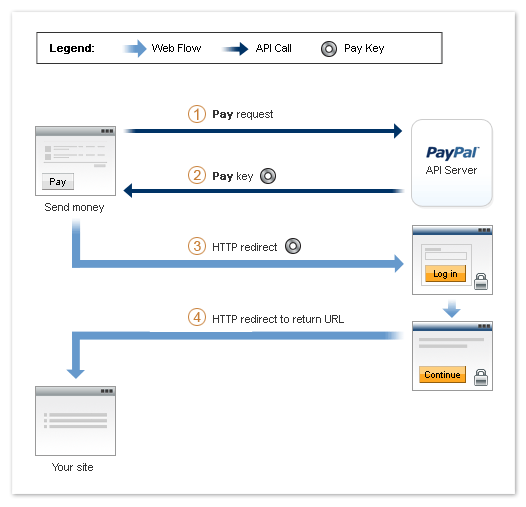
PayPal Adaptive PaymentsPaypal Adaptive Payments is feature of Paypal Pro means you must have Paypal pro account for use this payment method. In this customer can pay with Credit Card/Debit Card/Paypal.com account. While paying with Credit card/Debit card he can also create a account in paypal.com. Adaptive payments handles payments between a sender and one or more receivers.


There are two types of payments
1. Adaptive Parallel Payment
In this method, customer will pay to two or more vendor at the time. Also customer will be aware of the vendors with what amount they are getting.

Parallel Payment
For Example: Customer buy one product and pay $10 to each vendor, He will see two vendor name in Paypal.com as well as two orders in payment history.

Setup of Parallel Payment
https://developer.paypal.com/docs/classic/adaptive-payments/ht_ap-parallelPayment-curl-etc/


2. Adaptive Chain Payment
In this payment, Customer will see only one vendor name (Primary), He will be totally unaware of other beneficiary. In this case, First all amount will be transfer to primary vendor. then from the primary vendor amount will be deducted and transferred to other beneficiary.
Chain Payment

For Example: In Primary Vendor Payment history there will be n+1 records where n is number of vendor except self. It means if there is total 3 vendor (1 Primary + 2 Secondary), He will get 3 order (1. full payment, 2. Second vendor transfer money, 3. third vendor transfer money). You can set only one primary vendor who will get the money directly from customer other will be secondary get the money from primary vendor and primary vendor can't stop to giving money.

Vendor don't have paypal Account: If vendor don't have paypal account. Paypal will send an email to vendor, then vendor can register with that email and get his payment.


Adaptive payments Add shipping address
https://developer.paypal.com/docs/classic/api/adaptive-payments/SetPaymentOptions_API_Operation/


Example By Snapshots: