Wednesday, 28 January 2015

How to clear Facebook image cache

How to clear Facebook image cache

Following are way to clear the facebook's image from cache.
Step 1, Update the Image URL with version in Meta Tags
<meta content="http://www.aboutcity.net/images/web-technology-experts-notes.jpg?v=12" property="og:image"/>

Step 2:
A) Go to https://developers.facebook.com/tools/debug/
B) Enter URL and Press "Debug" Submit button
C) Click On "Show existing scrape information", It will remove the caching
D) Check the updated image


Following is Screenshot which explain, how to clear the Image Cache?
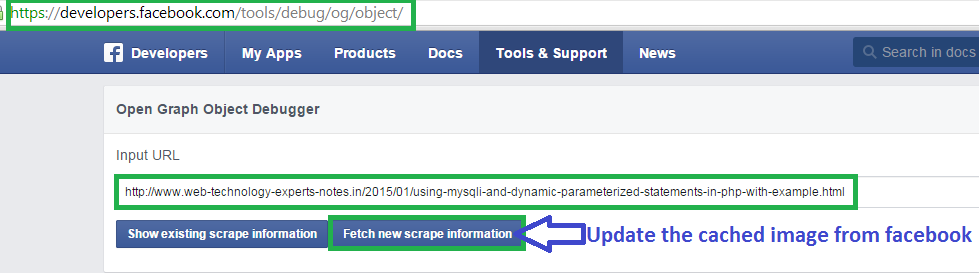
Facebook Open Graph not clearing cache


Tuesday, 27 January 2015

Google trends api php - How to get hot trends

Google trends api php - How to get hot trends


Google Trends is a public web facility of Google Inc., based on Google Search, that shows how often a particular search-term is entered relative to the total search-volume across various regions of the world, and in various languages. 
From: en.wikipedia.org/wiki/Google_Trends


Use following code to get the hot trends from google.
  
try {            
            $url='http://www.google.com/trends/hottrends/atom/hourly';                        
            $client = new Zend_Http_Client($url);
            $response = $client->request('GET');
            $jsonData = ($response->getBody());
            echo 'Google Trends';            
            preg_match_all('/(.*)<\/a>/', $jsonData, $trends);
            /** preg_match_all('/(.*)<\/a>/', $jsonData, $trends);**/
             foreach($trends[0] as $trend) {
                echo "{$trend}";
                }

        } catch (Exception $e) {
            echo 'Error' . $e->getMessage();
        }